👉 项目官网:https://www.python-office.com/ 👈
👉 本开源项目的交流群 👈




大家好,这里是程序员晚枫,正在all in AI编程实战,今天给大家分享一下Python自动化办公,最近1个月更新的功能。
以下代码,全部都可以免费使用哦~!
彩色的输出
有没有觉得python自带的无色输出看腻了?增加了彩色输出的功能,可以实现无痛替换。
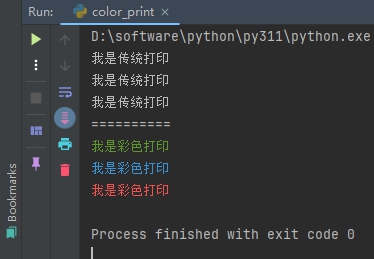
上面效果的实现代码如下,👇
1
2
3
4
5
6
7
8
9
10
11
12
13
14
15
16
|
print('我是传统打印')
print('我是传统打印')
print('我是传统打印')
print('=' * 10)
from pocode.api.color import random_color_print
random_color_print('我是彩色打印')
random_color_print('我是彩色打印')
random_color_print('我是彩色打印')
|
自动收发邮件
这个12月发布了一个开源项目:poemail,增加了自动收发邮件的功能。
1
2
3
4
5
6
7
8
9
10
11
12
13
14
15
16
17
18
19
20
|
import os
from datetime import datetime

import poemail

key = os.getenv('EMAIL_KEY')
msg_from = os.getenv('EMAIL_FROM')
msg_to = os.getenv('EMAIL_TO')
msg_cc = 'ai163361ia@163.com'
attach_files = [r'./test_files/4-send_mail_content_file/程序员晚枫.doc',
                r'./test_files/4-send_mail_content_file/0816.jpg']

poemail.send.send_email(key=key,
                        msg_from=msg_from,
                        msg_to=msg_to,
                        msg_cc=msg_cc,
                        msg_subject='带附件的邮件' + str(datetime.now().strftime('%Y-%m-%d %H:%M:%S')),
                        content='测试邮件发送' + str(datetime.now().strftime('%Y-%m-%d %H:%M:%S')),
                        attach_files=attach_files)
|
Word里提取图片
下面这1行代码,可以实现从Wotd里提取出所有的图片,包括表格中的。
1
2
3
4
5
|
import office
office.word.docx4imgs(word_path=r'./test_files/50-24-docx4imgs/程序员晚枫.docx',
img_path=r'./test_files/out')
|
OCR识别
ocr这个库发布很久了,这次增加了更多识别后直接保存为Excel的操作。
1
2
3
4
5
6
7
8
9
10
11
12
13
14
15
16
17
18
|
import poocr
poocr.ocr2excel.VatInvoiceOCR2Excel(input_path=r'test_files/50-15-VatInvoiceOCR2Excel/',
output_path=r'test_files/50-15-VatInvoiceOCR2Excel',
output_excel='程序员晚枫的发票.xlsx',
id='id',
key='key')
|
金融做T
同时开发了单次做T和批量做T的代码,我用单次做T比较多,至于赚了还是赔了,别问了,答应我。
1
2
3
4
5
6
7
8
9
|
from pofinance import MakeT
import pofinance as pf
t = MakeT()
print(t.single_t(27.11, 26.9, 300))
print(pf.t0(12.2, 12.3, 1000))
|
大家学习 或 使用代码过程中,有任何问题,都可以加入读者群交流哟~👇



相关阅读
🎓 AI 编程实战课程
程序员晚枫专注AI编程培训,通过 《50讲 · AI编程训练营》,让小白也能用AI做出实际项目。帮你从零上手!

 微信进群
微信进群